WordPress booking plugin for campgrounds and RV parks
Native online booking for your WordPress site. Your sites, rates, and availability render as real content in your theme — great for SEO, with no iframes anywhere.
Still deciding how to put booking on your site? Our guide compares the ways to take online campground reservations on your WordPress site.
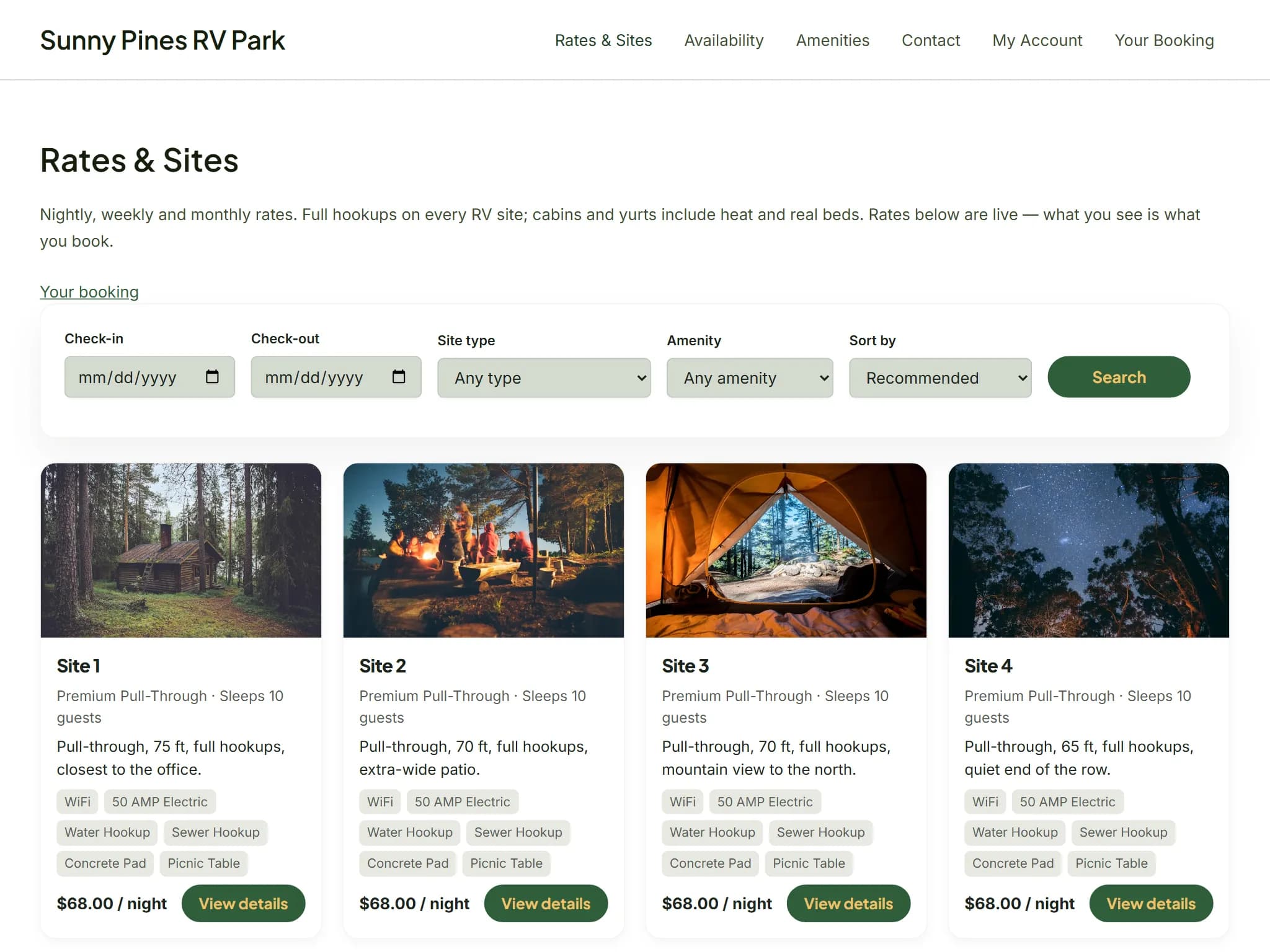
Booking Content That Lives on Your Site
The plugin renders your park's sites, photos, availability, and prices as native WordPress content — served by your theme, indexed by search engines, and readable even with JavaScript turned off.
SEO That Actually Works
Every site page is real, crawlable HTML on your domain. Search engines index your sites, rates, and amenities directly.
Inherits Your Park's Look
Pulls your park's brand colors and fonts straight from Lime, with a clean fallback to your WordPress theme's styles.
Fast and Cache-Friendly
Server-rendered PHP that plays nicely with page caching. Calendars and live quotes enhance progressively on top.
Up and Running in Three Steps
No developer needed. If you can install a WordPress plugin, you can add online booking to your site.
Download & Install
Download the plugin zip file, then upload it through the WordPress admin panel and activate it.
Connect with Your API Key
Generate a key in your Lime admin under Settings → Integrations → WordPress, paste it into the plugin settings, and click Connect.
Add Shortcodes or Blocks
Drop [lime_reservations] — or the matching editor blocks — on any page. Search, sites, availability, cart and checkout all render natively.
Installation Guide
Follow these steps to install and connect the Lime Reservations plugin on your WordPress site.
- 1Download the plugin zip file using the button above.
- 2In your WordPress admin, go to Plugins → Add New → Upload Plugin.
- 3Select the zip file, click Install Now, then Activate.
- 4In your Lime admin, switch your park's booking front-end to WordPress under Guest Portal → Settings. Lime asks for your site's address, and needs Square set up first — until then the plugin can't take bookings.
- 5In your Lime admin, go to Settings → Integrations → WordPress and generate an API key.
- 6In WordPress, go to Settings → Lime Reservations, paste the key, and click Connect — you'll see your park's name once it's linked.
- 7Add [lime_reservations] (or any shortcode or block below) to a page or post.
- 8Create three more pages for the rest of the booking — one holding [lime_cart], one [lime_checkout], and one [lime_confirmation].
- 9Back in Settings → Lime Reservations, set Cart page, Checkout page and Confirmation page to the three you just made. Guests need all three to book and pay without leaving your site.
Shortcode & Block Reference
The plugin's 11 shortcodes cover the whole booking, from a search form to the confirmation a guest reads after paying. Each one has a matching block in the editor — search for “Lime” in the block inserter to add them visually instead.
Basic Usage
[lime_reservations]
Feature a Single Site
[lime_site id="your-site-id"]
| Shortcode | Description |
|---|---|
| [lime_reservations] | The full browsing experience on one page: search form, matching sites, and site detail. |
| [lime_search] | A standalone availability search form. |
| [lime_sites] | A grid of your sites with photos, amenities, and rates. |
| [lime_site id=""] | A single site's detail — photos, amenities, availability calendar, and live quote. Set id to the site's ID from your Lime admin. |
| [lime_availability] | An availability calendar grid across your sites. |
| [lime_map] | Your park map, each site colored by availability for the guest's dates, with a quick look and Add to Cart. Draw and publish the map in your Lime admin under Settings → Maps. |
| [lime_cart] | The sites a guest is holding, with a live countdown until the hold expires, optional extras, and a running total. |
| [lime_cart_link] | A cart link with a count badge, for your menu or sidebar. |
| [lime_checkout] | Contact details, vehicle information when your park asks for it, card payment, and your park's real cancellation policy. |
| [lime_confirmation] | The booking confirmation guests land on after paying — order number, what was booked, and your check-in information. |
| [lime_account] | Guest sign-in and registration, profile editing, and their stays at your park. |
Booked and Paid For, Without Leaving Your Site
Every step of the booking is a page on your own domain, rendered by your own theme. Guests never land on a second website, and your park keeps the whole funnel — including the part where the money changes hands.
- 1Guests search your availability and compare sites, with your photos, amenities and rates as ordinary pages on your domain.
- 2They open a site and see a live calendar and a real quote for their dates — nightly rates, fees and taxes, priced by your Lime settings.
- 3They add the site to their cart, which holds it for them with a countdown so nobody else books it while they decide.
- 4They check out on your site: contact and vehicle details, your park's own cancellation policy, and card payment through Square.
- 5They land on a confirmation page with their order number and your check-in information — still on your site, and it survives a reload.
Card details go straight from the guest's browser to Square and never touch your WordPress server, so taking payment on your own site does not make your site responsible for card data.
Two live demo parks running on real data, not screenshots — one taking its bookings on its own WordPress site, one on a Lime-hosted portal.
One system. Two ways to take bookings.
Every park gets a guest-facing booking front-end. Pick the one that fits the website you already have — your park runs one or the other, so a guest is never handed between two versions of the same booking.
The hosted booking portal
We host your booking site at your own branded address. Nothing to install, nothing to maintain — set your colors and fonts and it looks like your park.
Best if you don't have a website, or you'd rather point the one you have at a booking page we keep running.
See the guest portalThe WordPress plugin
Your booking pages render inside your existing theme, on your own domain. Search engines index your sites as your pages, and guests never see a second brand.
Best if your park's site is already on WordPress and you want every visitor to stay on it, start to finish.
See the WordPress pluginBoth are included in the same plan, at the same price. You choose in your Lime admin under Guest Portal → Settings, and you can change your mind later — moving to WordPress just needs Square set up to take payment and your site's address on file.
Compatibility
- WordPress 6.2 or newer
- PHP 8.1 or newer
- The WordPress REST API must be enabled (it is by default) — availability calendars and live quotes use it
- Works with all major page builders (Elementor, Divi, WPBakery, Beaver Builder)
- Works with any WordPress theme
Don't have Lime Reservations yet?
Start your free 60-day trial and take your first online booking in minutes.