How to choose RV park reservation software: a checklist
A park changes its reservation software rarely, so few owners have a method for choosing it. Here is one: describe your park first, then hold every system you look at to the same checklist.
By Lime Reservations · Published
Before you look at software, write down how your park works
Demos are built to show a product at its best. You'll get far more out of them if you arrive knowing what your park needs. On one sheet of paper, note:
- How many sites you have and of what kinds (back-in and pull-through RV sites, tent sites, cabins), and which ones differ in price or rules.
- Where bookings come from today, whether phone, email, walk-ups or a booking form, and roughly how many you take in your busiest and quietest months.
- Your mix of stays: overnighters, weekly guests, monthly residents, seasonal sites.
- How money comes in now: deposits or full payment, cards, cash, checks, and who reconciles it.
- Who works the desk, and what each person should and shouldn't be able to see.
- What your website is today: none, a Facebook page, a WordPress site, something a relative built.
That sheet is your scorecard. A system that is excellent at things you don't do is not excellent for you.
The checklist
Copy these into a spreadsheet with one column per system, and tick what each one does in a demo or a trial — not what its brochure says it does.
1. Reservations and the calendar
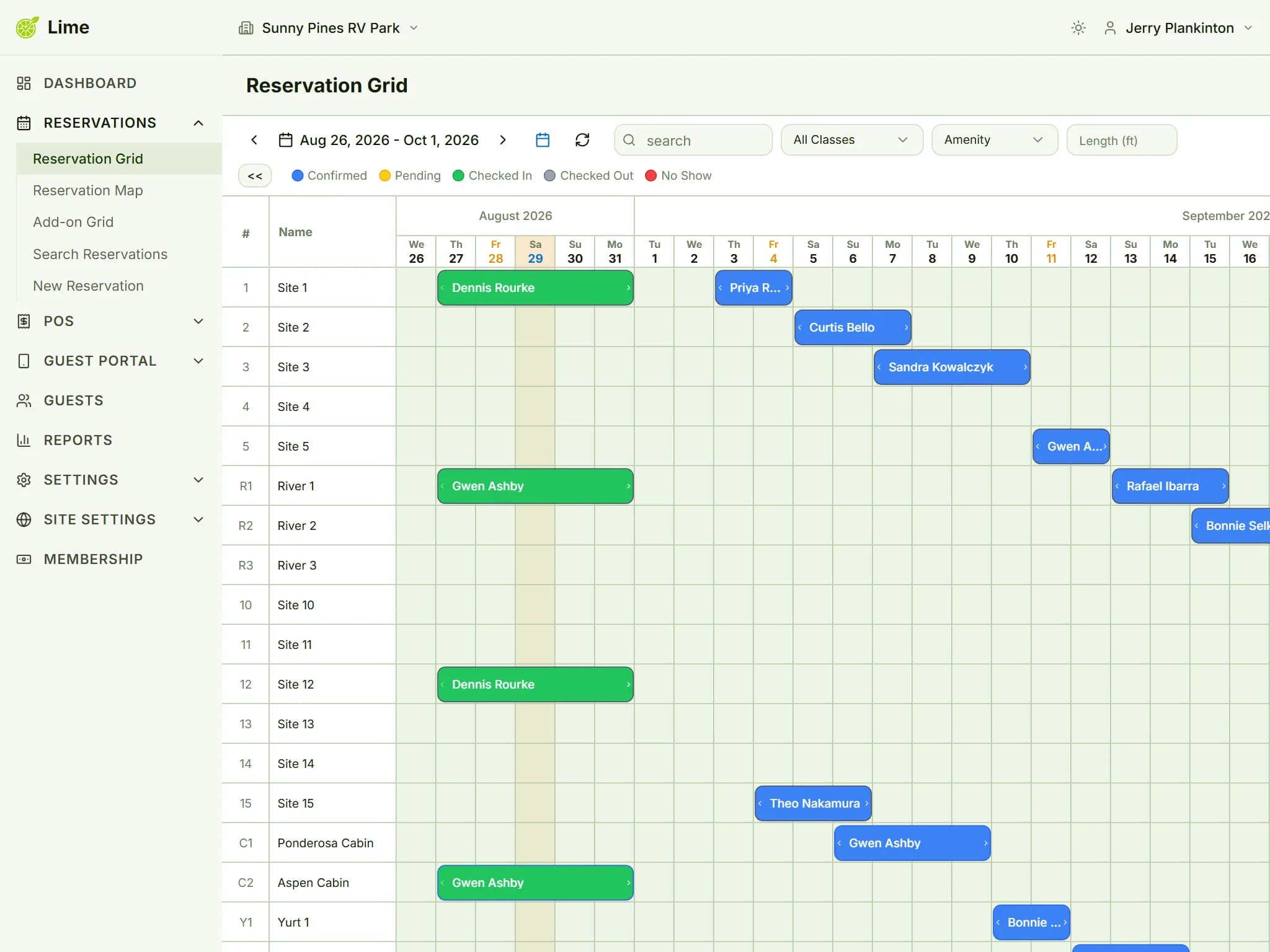
- Every site and every night is visible on one screen.
- A booking can be moved to another site, or lengthened, without re-entering it.
- Sites carry their own rules: longest RV, slide-outs, equipment types, minimum and maximum nights.
- Nightly, weekly, monthly and seasonal rates, with date ranges for peak season.
- A site can be blocked for maintenance so nobody books it.
- Monthly and seasonal guests live in the same system as overnighters.
In the demo, ask them to move a three-night booking to a different site and add a night. Count the clicks.
2. Online booking
- Guests see live availability from the same inventory your front desk uses.
- A site is held while a guest checks out, and released automatically if they leave.
- Booking is comfortable on a phone, not just possible.
- Guests can pay a deposit instead of the full stay, by rules you set.
- Your cancellation policy is shown before the guest pays.
- The booking pages carry your park's name and look, at an address you can print on a sign.
- If you have a website, guests can book on it without being sent to someone else's site.
In the demo, book a site on your own phone as a guest, then find that booking on the admin calendar.
3. Payments
- Which processor handles cards, and whether the money lands in an account in your name.
- Card payments at the desk as well as online.
- Cash and checks can be recorded against a reservation.
- Full or partial refunds from the reservation itself.
- Whether the software adds its own percentage on top of processing fees.
Ask for processing rates in writing, and whether you can keep a merchant account you already have.
4. Running the park
- A register for the camp store, with inventory counts.
- Housekeeping tasks and maintenance tickets.
- Occupancy, revenue and payment reports you can export.
- Accounting built in, or an export your bookkeeper can work with.
5. Staff and access
- Each person has their own login.
- Roles decide what each person can see and change.
- Extra staff accounts don't cost extra.
- Two-factor sign-in for accounts that can see money.
6. Price and contract
- The total for a whole year at your park, worked out from your own booking numbers.
- Which features sit in which plan, and what the plan you need costs.
- Setup, onboarding or training fees.
- Contract length, notice period, and how you get your data out when you leave.
7. Getting started
- A free trial long enough to cover a real booking cycle.
- Whether the trial needs a credit card.
- How your existing bookings get in: an import, or entered by hand.
- Who you can reach when something doesn't make sense, and how.
For the price questions, our guide to what RV park management software costs shows how to turn any quote, flat or per-reservation, into that one yearly number.
How Lime Reservations answers it
We'd rather you check than take our word for it, so here are our own answers, including the ones that aren't a tick.
| Checklist item | Lime Reservations |
|---|---|
| One-screen calendar; drag to move or extend | Yes: the reservation grid, color-coded by status. |
| Site rules and rate types | Longest RV, slide-outs, equipment types and minimum or maximum nights per site; daily, weekly, monthly and seasonal rates. |
| Holds during checkout | Yes, for the number of minutes you set, released automatically. |
| Deposits online | Yes: a percentage or a fixed amount, optionally only for certain arrival dates or bookings made far enough ahead. |
| Booking on your own website | Your choice of the hosted booking portal at your own branded address, or the WordPress plugin on your WordPress site. One or the other, at the same price. |
| Payments | Square, into your own Square account, online and at the desk. Cash and checks are recorded against the reservation. Lime adds no percentage. |
| Camp store, housekeeping, reports, accounting | All included in the one plan. |
| Staff | Unlimited accounts, role-based permissions and two-factor sign-in. |
| Price | $19 a month plus $1 per reservation, every feature included. |
| Leaving | Our terms let either side end the subscription at any time, and you can request a full export of your data when you go. |
| Free trial | 60 days, no credit card, with or without sample data. |
| Importing existing bookings | No spreadsheet import: upcoming bookings are entered by hand. |
| Booking on WordPress with JavaScript switched off | No. Browsing, prices and availability work without it; holding a site and paying need it. |
Five questions to ask in every demo
- 1Can you show me a booking made on a phone appearing on the calendar, live?
- 2What will my park pay in a year, worked out from my numbers rather than your example?
- 3What isn't included in the plan you're quoting me?
- 4Whose account do card payments land in, and what do you take from each one?
- 5If I leave, how do I get my data out, and how much notice do you need?
Any vendor worth choosing will answer all five without hesitating. If your site runs on WordPress, add the questions from our guide to taking online campground reservations on your WordPress site.
Keep reading
- What RV park management software costs: flat fees vs per-reservation pricing
How flat, per-site, tiered and per-reservation pricing compare, the costs a quote leaves out, and a worked year for a 40-site park — with the arithmetic to check any quote against your own numbers.
- How to take online campground reservations on your WordPress site
A book-now link, an embedded widget, a general booking plugin or a plugin wired to your reservation system — what each does to your bookings and your search traffic, and how to set the last one up.
- Affordable RV park software for small parks
What a park with 10 to 60 sites actually needs, and why per-reservation pricing suits it.
- Online campground reservation system
How Lime takes a booking online: live availability, cart holds, deposits and Square checkout.